
Toyota review
 Analysis by GetAllApps
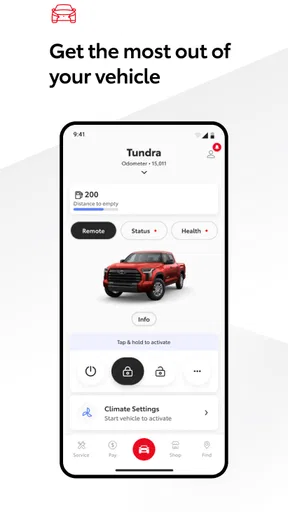
I think of Toyota as a companion to owning a Toyota, not as a general-purpose driving app. Its value depends on whether you have a supported vehicle and want a convenient place to handle ownership tasks. If you mainly need maps, traffic, or a log of fuel expenses, your phone’s existing tools may serve you better. But for keeping car-related information close at hand, the app has a clear purpose.
What the app is useful for today
Toyota is a free Android app from Toyota Motor North America, Inc., in the auto and vehicles category. It has a 4.7 average from around 188,000 ratings, and more than five million installs. That broad adoption suggests many owners find a reason to keep it, though popularity alone does not tell you whether it fits your particular car or routine.
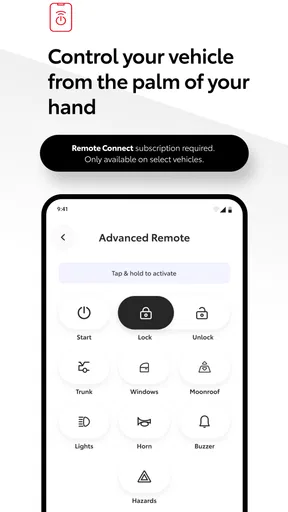
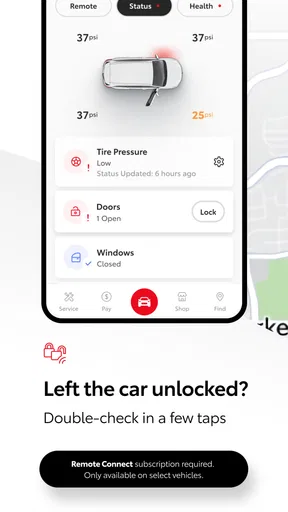
The essential compatibility detail is worth checking before you build a habit around the app: it supports Toyota vehicles from 2010 onward, with Hawaii requiring a 2018-or-newer vehicle. That is a useful starting point, not a promise that every function will be identical for every model. I would install it with a specific task in mind—such as checking the information associated with my car—then see what is available for that vehicle rather than assuming the app will behave like a universal remote.
For someone who owns one Toyota and wants a manufacturer-specific place to manage the relationship with it, that focus is a strength. The app is less compelling as a daily dashboard for all driving. It is not a replacement for a navigation app, and it will not make a non-Toyota car easier to manage. If your household switches between several makes, a neutral maintenance tracker may be more practical for the overall fleet.
Where it fits in an owner’s routine
A realistic use case is the small task that comes up when you are away from the car: you want to look up something connected with your Toyota, but do not want to search through old paperwork or remember which account or document holds it. A manufacturer app can make that ownership relationship easier to return to. I would treat it as a convenient companion, while keeping important records somewhere I can still reach if I change phones or stop using the app.
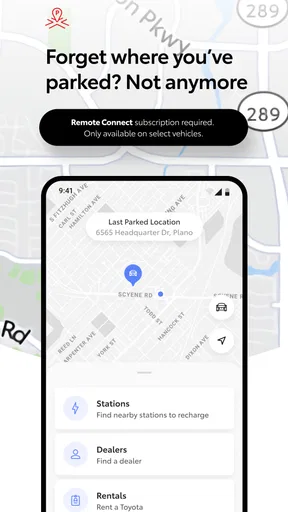
There is also a useful distinction between information about a car and information about a trip. Toyota’s app is most naturally suited to the former. If I am planning a route, comparing traffic, or trying to find a destination, I would reach for a dedicated mapping tool. If I am trying to stay organized around a Toyota I own, the official app is the more relevant place to start.
That division helps set expectations. A branded app can feel like a single home for ownership, but the owner’s actual needs are broader: service decisions, insurance records, navigation, roadside help, and household budgeting may each involve different tools. I would not move every part of car ownership into one app simply because it carries the manufacturer’s name.
Compatibility is the first practical check
The supported model-year range is broad enough to make the app worth checking for owners of older Toyotas, but the Hawaii exception matters. If you live there, a 2017 vehicle falls outside the stated support range, whereas the threshold there is 2018 or newer. That is the kind of detail that can save time: confirm the vehicle and region before spending effort setting up an account or changing your routine.
For owners of eligible vehicles, I would still avoid assuming that every capability applies to every model. Car apps often depend on the vehicle itself, and Toyota’s broad support statement should not be read as a guarantee that a particular function is present across the whole range. The practical approach is to check what the app actually offers for your own vehicle, then decide whether that justifies keeping it installed.
This is especially relevant if you are considering the app for a used Toyota. The model year may be within the supported range, but the experience you care about could still depend on the specific car and the way you intend to use the app. Before relying on it for an important ownership task, I would verify that the relevant information is visible and usable for that vehicle.
What its version tells us—and what it does not
The current version is 3.6.0, and the app was released on August 6, 2019. That gives a simple picture of a product that has been available for several years and continues to have a current version. It does not, by itself, reveal which features changed, how often updates arrive, or whether an update has altered the experience for a particular owner.
I would therefore read version information as context, not as proof of a specific improvement. A version number can help you identify the build you are using when troubleshooting or comparing notes with another owner, but it cannot tell you whether the app has gained a feature you need. For that, look at the actual screens and functions available on your device after installation.
For existing users, the sensible habit is to check the app after an update rather than assuming that your familiar workflow is unchanged. If you use it only occasionally, you may not notice a small interface adjustment until you need the app in a hurry. Taking a moment to confirm that you can still reach the information you rely on is a low-effort way to avoid discovering a change at an inconvenient time.
How it compares with the usual alternatives
Compared with a general car-maintenance tracker, Toyota’s app has the advantage of being tied to Toyota rather than asking you to build a vehicle profile from scratch. That manufacturer focus is useful when the task is specific to your Toyota. A third-party tracker may be the better choice if you want one consistent log for several makes, or if your main goal is recording work done by different shops across a household fleet.
Compared with navigation apps, the trade-off is even clearer. Navigation tools are designed around destinations, routes, and live driving decisions; Toyota is an ownership companion. I would keep both only if they solve different problems. Trying to use the Toyota app as the one app for every driving need is likely to create frustration, while judging it by its ability to compete with a dedicated map app misses its intended role.
Paperwork and a dealer conversation remain alternatives too. If you rarely use digital car services, keeping records in a folder and contacting a dealer when needed may be enough. The app makes more sense for an owner who wants to check in digitally and is comfortable managing a car-related account on a phone. Convenience is real only when the app becomes easier than your existing method.
Small workflow choices that make it more useful
My first tip is to treat setup as a test rather than a commitment. Install the app, check that your Toyota is recognized as expected, and inspect the parts you would genuinely use. If the information you need is not available for your vehicle, there is little benefit in keeping the app merely because it is official. This avoids building a routine around an assumption.
My second tip is to separate quick reference from recordkeeping. Even when an app is handy for checking vehicle-related information, I would keep copies of essential documents and service records in a place I control. That way, the app can remain a convenient shortcut without becoming the only home for details I may need later, such as when changing phones or selling the car.
A third useful habit is to make the app part of a calm ownership check, not something you depend on for an urgent roadside decision. Explore it while parked and when you have time to understand what your vehicle’s setup supports. If an unexpected problem occurs, you will already know whether the app is relevant; if not, you can turn to the appropriate service or resource without trying to learn the interface under pressure.
Limits that may matter in everyday use
The most important limitation is that the app’s usefulness is tied to having a supported Toyota. That makes it a poor choice for a driver who wants one tool for any car, and it may not suit someone whose vehicle falls outside the relevant model-year range. The Hawaii cutoff makes that distinction especially concrete.
The next limitation is expectation management. The app’s name and official association can lead owners to expect a complete digital version of every dealership interaction or a full suite of capabilities for every model. I would not assume that. Check the actual options available for your vehicle, and keep other tools for needs the app does not cover well.
There is also the ordinary friction of adding another account-based app to a phone. If you already have a reliable method for tracking maintenance and rarely need Toyota-specific information, the extra setup may not pay off. The app is best when it replaces a repeated annoyance; it is less valuable when it simply duplicates a system you already use comfortably.
Who I would recommend it to
I would recommend trying Toyota if you own an eligible Toyota and want a direct, phone-based connection to your car’s ownership information. It is particularly sensible for someone who prefers checking details digitally instead of relying entirely on memory, paperwork, or a dealer visit. The Everyone age rating also makes clear that the app is not restricted to an older audience, though the vehicle and account requirements are what matter most in practice.
I would skip it if you do not own a Toyota, if your vehicle is outside the supported range, or if you want a universal tracker for multiple brands. I would also avoid making it your only source for important records. In those situations, a neutral maintenance app, your existing filing system, or a tool designed for the task at hand may be a better fit.
At its core, this is a focused ownership app rather than an all-purpose driving utility. I like that focus, provided you approach it with realistic expectations: confirm compatibility, explore the functions available for your own car, and keep a backup for essential records. With more than 22,000 written reviews and an Everyone content rating, it has clearly reached a large audience, but the deciding question is still personal: does it make managing your Toyota easier than the method you use now?
What I would watch as a user
Because the app has a current version, I would keep an eye on whether later updates improve the specific parts of the experience I use, rather than treating a new version number as an improvement on its own. If an update changes a familiar workflow, I would check that my usual tasks still work. If I am considering the app for a newly purchased or older Toyota, I would also verify compatibility for that vehicle before depending on it.
My overall view is positive but practical. The best reason to install Toyota is not that it promises to replace every car app, but that it may make Toyota ownership easier to manage in one focused place. If that solves a recurring problem for you, it is worth trying; if not, there is no need to force it into your routine.
Toyota is a useful companion when the car itself is the reason you opened your phone. Keep it for Toyota-specific ownership tasks, pair it with dedicated tools for navigation or broader recordkeeping, and let your own vehicle’s available options decide how central it becomes.
Pros and cons
Pros
- Toyota offers a broad range of cars to suit different budgets and needs.
- Many Toyota models have a strong reputation for reliability.
- Hybrid options can help reduce fuel use in everyday driving.
- Toyota vehicles are widely supported by dealerships and service centers.
- Resale values are often competitive compared with similar cars.
Cons
- Some Toyota models have less engaging handling than rivals.
- Base trims may omit features available as standard elsewhere.
- Infotainment systems can feel dated in certain models.
- Popular models may have long waiting times in some markets.
- Hybrid versions often cost more upfront than petrol equivalents.


